


MP3 Downloader - Music Player
4.318.57K Reviews
App Specs
- Version
- 20260509
- Updated On
- License
- Free
- Downloads
- 100,000,000+
- Developer
- Super Music Player Downloader
- Categories
- Music & Audio
- Platform
- Android, iOS
Screenshots
 Analysis by AppCompare
I judge a music app less by the first few minutes than by whether it remains useful once the novelty wears off. A downloader can feel exciting when I’m filling a fresh library, but its lasting value depends on how well it fits ordinary listening: finding a track, keeping a playlist usable, and having something to play when the connection is unreliable. MP3 Downloader - Music Player brings those jobs together, which makes it worth considering if you want more than a basic player.
Why the first week feels inviting
For a new user, the appeal is easy to understand. Search, playback, lyrics, playlists, and offline listening sit within one music-focused app rather than requiring a separate player for every task. The interface feels approachable, so I can imagine someone building a small collection without first learning a complicated library system. That low learning curve matters most when I only have a moment to look up a song or start a playlist.
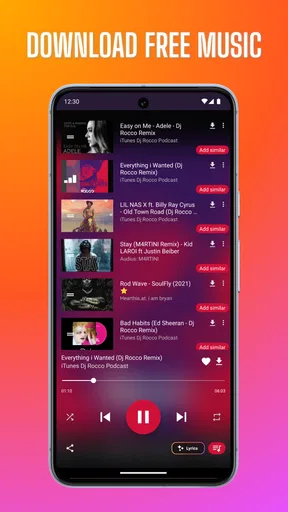
The downloading workflow is especially useful when I treat it as preparation rather than an impulse. If I know I’ll be commuting through areas with weak reception, I can search for music beforehand and make sure the tracks I want are available offline. A practical habit is to download a short, dependable selection for that trip instead of relying on a large library I may not have time to sort. The app’s combination of search and local playback makes that routine feel direct.
A realistic listening routine
Picture a weekday with a bus ride, a walk, and a workout squeezed between other plans. I might use the connection at home to find a few tracks, check that they appear in my library, and arrange them into a commute playlist. Later, offline playback gives me a fallback when service drops; at the gym, shuffle can keep that same collection from feeling too predictable. Lyrics are a separate bonus for a quiet evening when I want to follow a song rather than just leave it playing.
This is where the app makes more sense than a tool I open once and forget. The useful loop is small: discover or search, save what I expect to hear, then play and reorganize as my mood changes. I wouldn’t use every feature every day, but the mix can suit someone whose listening shifts between planned playlists and quick searches.
The Ultimate Music Companion
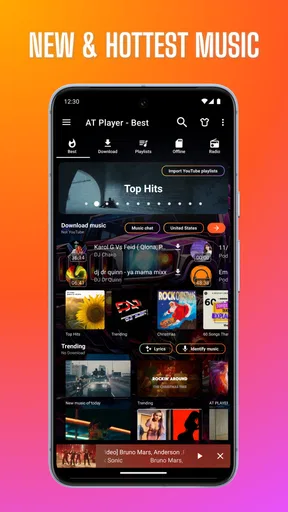
First off, MP3 Downloader - Music Player is a breeze to navigate. The interface is clean and user-friendly—a relief in a world filled with cluttered apps. You don't need to be a tech wizard to find your way around, which is always a plus in my book.
Downloading Made Easy
Now, let's dive into the main attraction—downloading music. It's as simple as pie. You can search for your favorite tracks, artists, or albums, and the app pulls up a list of available options. Just a couple of taps and voilà! The song is added to your library. It's like having a personal DJ at your fingertips.
Worth Reading Before You Choose

Baby Panda World Brings Quick Play to Modern Phones, but Its Game Library Feels Busy

ESPN’s Live Game View Makes Following Close Games Easier

QuizzLand Review: A Good Fit for Short Trivia Breaks, Not Every Player

Basketball Stars: Multiplayer Is Fast, but Can It Recover When Matches Go Wrong?

WEBTOON Turns Phone Updates Into a Better Reading Routine

Link to Windows Runs on Shared Habits, Not Social Feeds
The download speed is pretty impressive, so you won't be left hanging while waiting for your tracks to load. I've had some apps in the past where I could practically watch paint dry while waiting for downloads, but not with this one!
Music Player Perks
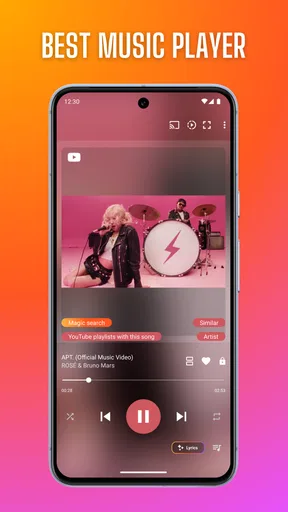
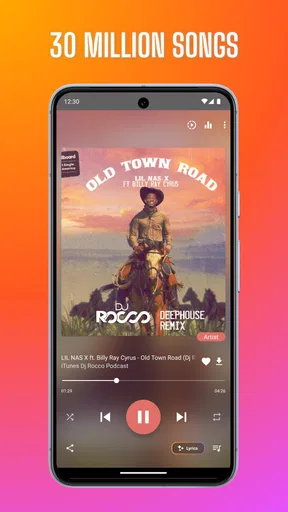
Once your music is downloaded, playing it is a seamless experience. The in-app music player handles all your audio needs. The sound quality is superb, and you have the usual features like shuffle and repeat to keep things interesting. Plus, the app supports a wide range of audio formats, so you're not stuck with just MP3s.
One of my favorite features? The ability to create and customize playlists. Whether you're in the mood for some chill vibes or a high-energy workout session, you can organize your music just the way you like it.
Offline Listening
In a world where data usage is a constant concern, offline listening is a lifesaver. With MP3 Downloader - Music Player, you can enjoy your downloaded tracks without worrying about internet connectivity. Perfect for long flights or when you're out in the boonies with spotty service.
Search and Discover
For those who love discovering new music, the app's search feature is a gem. You can explore different genres, check out what's trending, or dive into recommendations based on your listening habits. It's like having a music curator in your pocket.
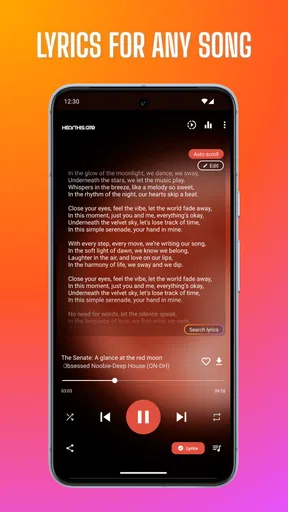
Oh, and did I mention the lyrics feature? Singing along has never been easier. Just tap on a track, and the lyrics pop up so you can belt out your favorite tunes word for word. It's those little extras that make the app feel special.
Compatibility and Performance
The app runs smoothly on both Android and iOS devices, which is a huge win. No one likes an app that crashes mid-song, and thankfully, performance here is rock-solid. Regular updates ensure any bugs are quickly squashed, keeping the app running like a well-oiled machine.
Battery consumption is also minimal, so you won't find your phone dying on you after a music marathon. It's efficient, and that's something we can all appreciate.
Keeping a library manageable
The most useful long-term tip I can offer is to treat downloads as a selected listening shelf, not a substitute for organizing every song you have ever liked. A few playlists with clear purposes—such as a commute mix, a workout queue, and a slower evening selection—make it easier to find something quickly than one enormous catch-all list. I’d also revisit those lists when my routine changes, removing tracks I skip and keeping the offline collection relevant.
That small bit of upkeep is the trade-off for having music ready without a connection. Offline access is only valuable if I have already saved the right tracks, so I would make a habit of checking a playlist before leaving rather than discovering on the bus that I never prepared it. For a longer outing, I’d choose a mix that can stand on its own instead of assuming I’ll be able to search for something new along the way.
Where it sits among alternatives
Compared with a conventional streaming service, this app’s appeal is the focus on searching for tracks and keeping a library available for offline play. Streaming-first apps are often the more natural choice if I want a broad subscription catalog and a polished, continuously refreshed listening experience. A basic music player, meanwhile, may be preferable if I already have an organized collection of audio files and simply want to play them without discovery or downloading tools. This app is most compelling when I want those activities gathered together.
That convenience does not make it the best fit for every music habit. Someone who values a carefully curated subscription catalog, seamless syncing across devices, or a highly specialized audio setup may be happier with a different service or player. I’d also be deliberate about what I download and play: access to a search result should not be treated as permission to use music in any way. The sensible approach is to stick to tracks I’m entitled to save and listen to.
Month-to-month value and maintenance
There is a clear difference between trying the app because downloading sounds appealing and continuing to use it as part of a routine. Its lasting value depends on whether I actually return to the saved music, playlists, and lyrics features. If I mostly stream elsewhere and rarely need offline listening, the extra library may become another thing to maintain. If I regularly travel, exercise, or spend time in places with unreliable service, that same library can earn its space on my phone.
The app is free to start, while in-app purchases range from $0.99 to $99.99 per item. I would check what an optional purchase covers before paying and decide whether it solves a problem I genuinely have; a free starting point is useful, but it does not mean every extra is automatically worthwhile. The developer is Super Music Player Downloader, and the app is listed for Teen users. It has a 4.3 average from around 613,000 ratings, with more than 100 million installs, so it has clearly reached a large audience without that popularity alone telling me whether its workflow suits my habits.
On Android, the listed minimum is version 6.0, and the current version is 20260509. The release date is December 1, 2016. Those details make it worth checking compatibility on an older device before relying on it for a trip, while a current installation is the sensible starting point if I want the latest available build. I wouldn’t assume that a familiar feature behaves identically on every phone; testing the search, a download, and offline playback before depending on them is a simple precaution.
Small friction points that affect the habit
A combined downloader and player asks me to make decisions a streaming-only app can hide: what to keep, what to put in a playlist, and what I’m likely to want offline later. That control is useful, but it can turn into clutter if I save every search result. Lyrics and discovery can make browsing more engaging, yet they can also encourage me to spend time exploring when I only meant to start listening. I’d use search with a purpose when I’m in a hurry and save open-ended discovery for when I actually want it.
There is also a practical distinction between having offline playback and never needing the internet. I still need a connection when I’m finding or preparing music, so the app works best when I plan ahead. Before a flight or a long commute, I’d open the intended playlist while connected and confirm the tracks are ready. That quick check is more dependable than finding out at the moment I lose reception.
For a simple decision, I’d ask myself whether I want a ready-to-go collection or a service that handles most catalog and library decisions for me. If I enjoy choosing tracks and shaping playlists, the app’s hands-on approach can be satisfying. If I want to press play on an endless, professionally organized stream and never think about downloads, a streaming-focused alternative will probably feel easier.
Wrapping It Up
All in all, MP3 Downloader - Music Player is a fantastic app for anyone who loves music. It's versatile, easy to use, and packed with features that make listening to music a pleasure rather than a chore. Whether you're a casual listener or a hardcore audiophile, this app has something for everyone.
So, if you're on the lookout for a reliable music companion, give this app a spin. Trust me, your playlists will thank you!
Who should keep it installed?
I’d recommend trying it if your week includes dead zones, commutes, travel, or workouts where you want a playlist ready without depending on a steady connection. It is also a reasonable pick if you like searching for music and then arranging what you find yourself. A person who mainly wants to manage existing local files, or who prefers a subscription service to handle discovery and offline access as one integrated catalog, may be better served by a more specialized alternative.
For me, the deciding question is not whether the app offers enough to explore in the first week; it does. It is whether I would prepare music and return to those playlists month after month. If I make that preparation part of my routine, the combination of search, lyrics, playlists, and offline playback has a practical purpose. If I don’t, the downloader side is likely to feel like an extra step rather than a lasting convenience.
Pros
- User-friendly interface for easy navigation.
- High-quality audio downloads available.
- Supports multiple audio formats.
- Fast download speeds for quick access.
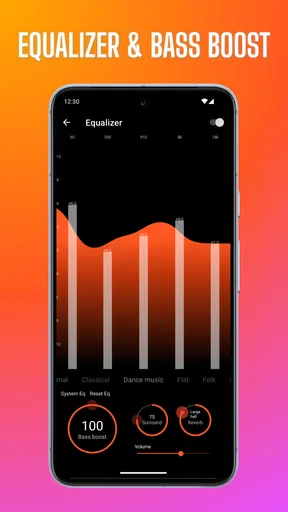
- Built-in music player with equalizer.
Cons
- Contains in-app ads that can be intrusive.
- Limited offline features without premium.
- May not find less popular tracks.
- Occasional crashes on older devices.
- Requires internet for initial downloads.
FAQs for MP3 Downloader - Music Player
Is MP3 Downloader - Music Player free to use?
Yes, MP3 Downloader - Music Player is free to download and use. However, it may offer in-app purchases or ads to support its free features. Users can access basic functions without cost, but some advanced features might require a purchase. Always check the app's store page for specific pricing details.
Can I download music for offline listening?
Absolutely! MP3 Downloader - Music Player allows users to download their favorite tracks for offline listening. This feature is particularly useful for those who want to enjoy music on the go without worrying about data usage or connectivity. Ensure your device has sufficient storage space for downloads.
Is the app legal and safe to use?
MP3 Downloader - Music Player is designed to provide a legal and safe music downloading experience. It sources music from legal platforms, ensuring compliance with copyright laws. However, users should always ensure they download content responsibly and check the app's terms of service for any legal stipulations.
Does it support multiple audio formats?
Yes, the app supports a variety of audio formats beyond just MP3. This includes popular formats like WAV, FLAC, and AAC. This versatility allows users to enjoy high-quality audio in their preferred format, making it a flexible choice for any music enthusiast.
Are there customizable features in the music player?
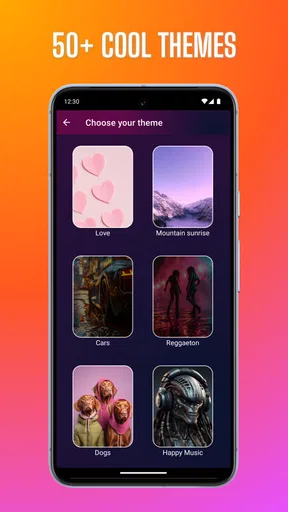
MP3 Downloader - Music Player offers several customizable features, such as equalizer settings, playlist creation, and theme options. Users can tailor their listening experience to match their preferences, enhancing the overall usability and enjoyment of the app. Explore the settings to make the most of these options.


